

Navigation and anchor light wiring
How to Wire a Navigation and Anchor Light Rocker Switch
By New Wire Marine Technical Team · Updated October 6, 2026
A NAV/ANC switch has to do two different jobs. In NAV, it turns on the red and green navigation lights and the white anchor light. In ANC, only the white anchor light comes on.
The VJD1-D66B is a DPDT, or double-pole double-throw, ON-OFF-ON switch. That arrangement lets one rocker control the two lighting combinations. Two short jumpers make the switching work. Wire either jumper incorrectly and the lights won’t follow the rocker the way you expect.
This guide shows the seven-terminal switch used in the video, explains what each connection does, and points you to the right diagram if your panel uses backlighting or a ten-terminal switch.
Watch the wiring
See the 7-pin NAV/ANC rocker switch connected
The video walks through the VJD1-D66B terminal layout, the two required jumpers, and the separate outputs for the anchor and navigation lights.
Before you move a wire
Disconnect battery power and read the switch body number
Turn off and isolate battery power before removing the old switch or moving a terminal. Use the numbers molded into the switch body, not the apparent position of a terminal in a photo.
The main instructions below are for the seven-terminal Carling VJD1-D66B. A backlit VJD1-U66B or a ten-terminal VJD2 body uses a different diagram.
Wire the seven-terminal VJD1-D66B
Step 1
Identify the switch body and numbered terminals
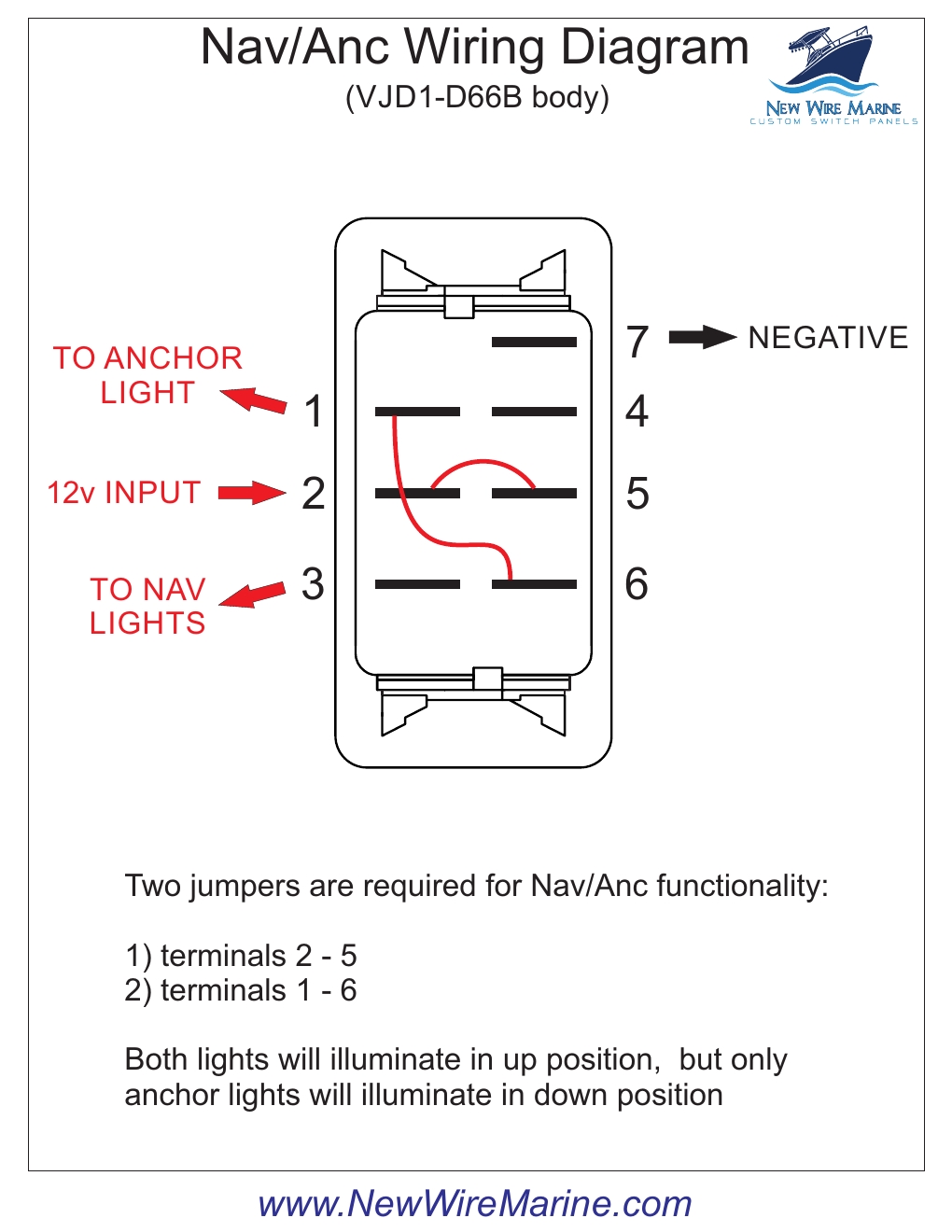
Confirm that the body is marked VJD1-D66B and find terminals 1, 2, 3, 5, 6, and 7. If the body number or terminal count doesn’t match, stop and use the diagram written for that switch.
Step 2
Connect protected 12V power to terminal 2
Bring the fused or breaker-protected positive feed to terminal 2. This is the source that supplies both switch positions after the jumpers are installed.
Step 3
Add the two jumpers
Connect one jumper between terminals 2 and 5. Connect the second jumper between terminals 1 and 6. Those two links are what let the anchor light run in both NAV and ANC.
Step 4
Connect the anchor, navigation, and negative wires
- Terminal 1: anchor-light output
- Terminal 3: navigation-light output
- Terminal 7: negative for the switch lamps
- Terminal 2: protected 12V input
Step 5
Restore power and test both switch positions
In NAV, the navigation lights and white anchor light should come on together. In ANC, only the white anchor light should come on. If the lights don’t follow that pattern, disconnect power and compare every terminal and jumper with the diagram before moving anything else.
Use the diagram that matches the switch
Seven terminals, backlighting, and ten terminals are different setups
7-pin, no separate backlight
Use this for the VJD1-D66B shown in the video. It uses jumpers from 2 to 5 and from 1 to 6.
7-pin with a backlight trigger
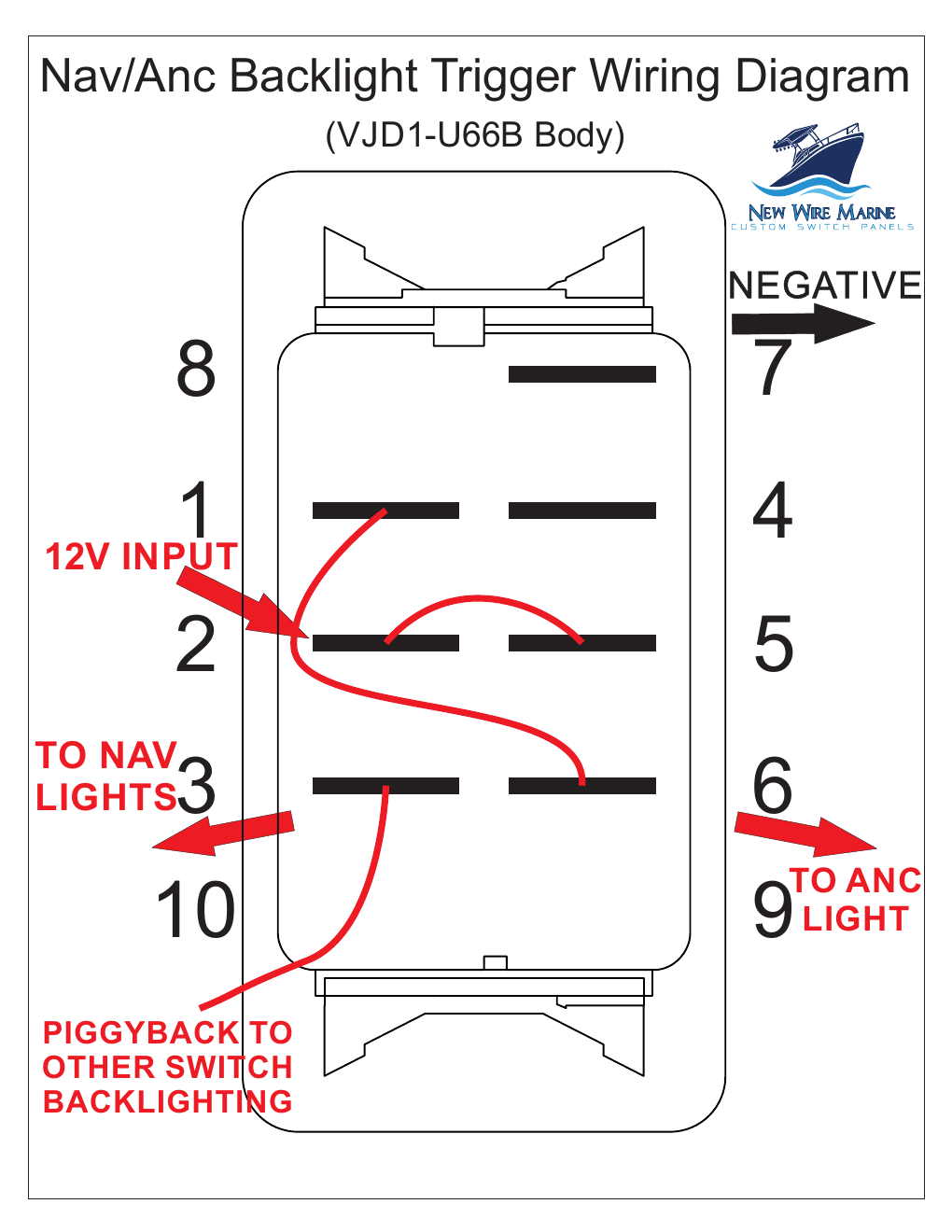
Use this for the VJD1-U66B when the panel lighting needs a separate backlight trigger.
10-terminal NAV/ANC switch
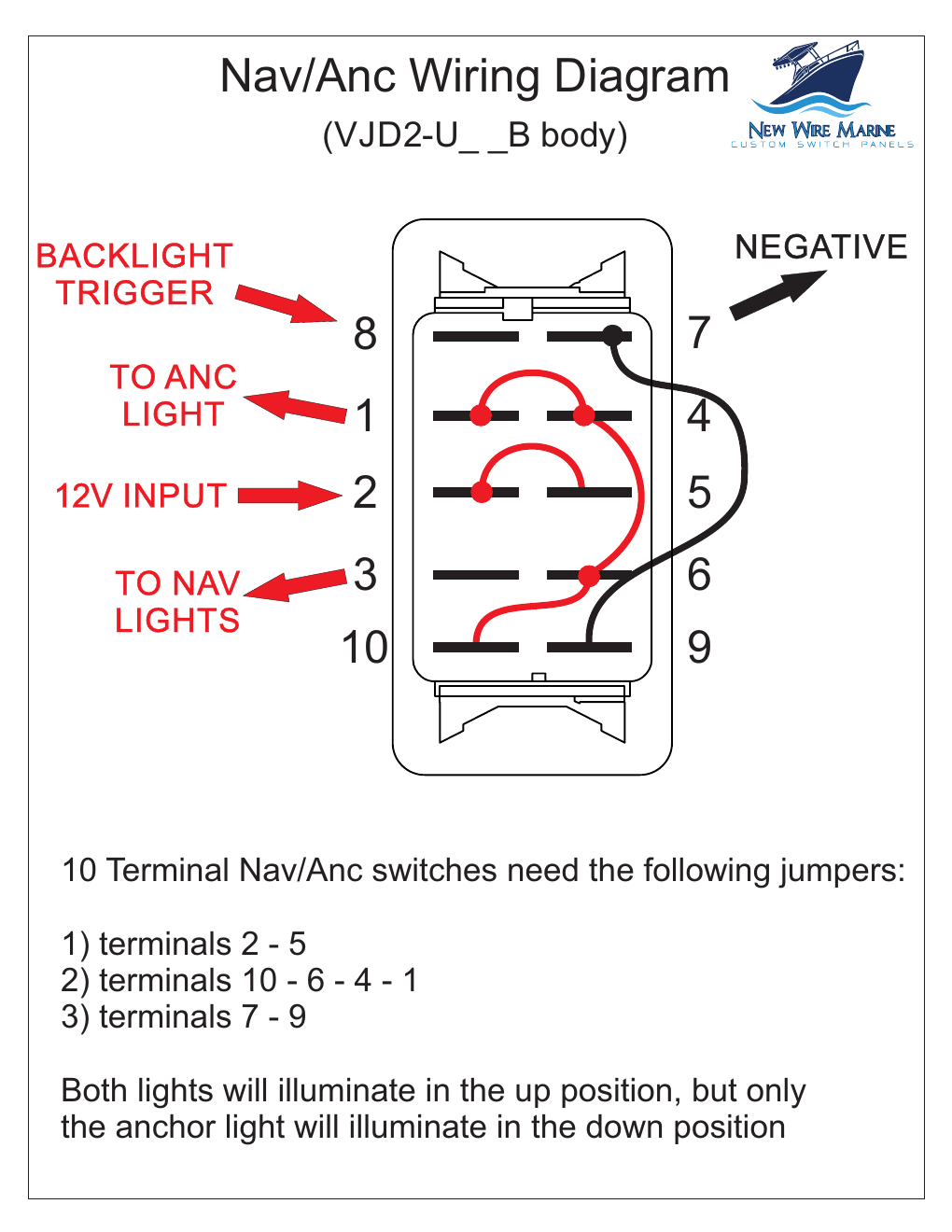
Use this for a VJD2 body. Its terminal layout and jumper arrangement are not the same as the seven-terminal switch.
Not sure which switch is behind the cover?
Count the terminals and read the body number before choosing a diagram. The label on the front tells you the job. The body number tells you how the switch is wired.
Products for this project
The switch and connections used for a NAV/ANC circuit
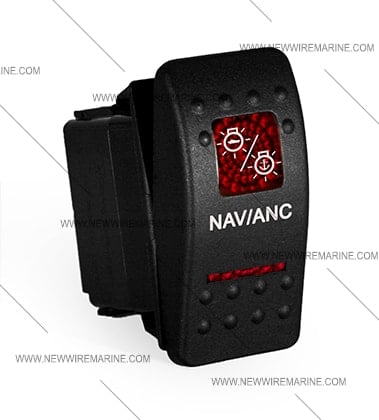
Start with the switch body that matches the diagram. Then choose terminals and jumpers sized for the wire already in the boat.



Frequently asked questions
What should happen in the NAV position?
The red and green navigation lights and the white anchor light should all come on.
What should happen in the ANC position?
Only the white all-around anchor light should come on.
Why are two jumpers required?
The jumpers route the same protected power feed through both switch poles and keep the anchor light available in both ON positions.
Can I use the seven-terminal diagram for a ten-terminal switch?
No. The ten-terminal VJD2 body uses a different terminal layout and three jumper connections. Match the diagram to the body number.
What if the anchor light works in one position but not the other?
Disconnect power and check the 1-to-6 jumper, the 2-to-5 jumper, and the anchor-light connection at terminal 1 against the seven-terminal diagram.
Keep learning
Choosing the Right ON-OFF-ON Switch for NAV/ANC
Compare switch functions before replacing the body behind the cover.
Rocker Switch Wiring Diagrams
Find the diagram that matches the body number and terminal count.